
We recently did exactly this for a legal advice firm. Their story shows where low-code stops, and what it takes to make low-code and custom code work as one app.
What did the legal advice firm need?
The firm was managing all its client cases in one system, but that system had reached end of life and could no longer be used. Staff were increasingly setting client appointments and tracking working hours in Excel sheets, and case history notes ended up scattered across various locations. The full record of a case was no longer centralised.
So the firm asked us at Blis for a new, bespoke system designed around their own business processes.
Luckily, their business processes were well defined. The firm has three types of employees: legal advisors, support staff and managers. The legal advisors work in scheduled shifts (morning, afternoon or evening), and they can be stationed at any of the firm's locations, which don't all keep the same opening hours. Support staff manage client appointments for the legal advisors, and managers need management information dashboards.
And of course, there's staff absence. When a legal advisor is absent, their appointments still need to be kept and their shifts covered, which means someone needs to see what's affected and be able to reassign work to available colleagues.
In summary, the appointment system had to display accurate information about staff whereabouts, the status of their ongoing client cases, and the case history.
Where does low-code stop? Find out early
We chose Power Apps, specifically a Model Driven App (the standard, form-based app type in Power Apps). During discovery, it became clear that it could handle clients, cases and most of the admin. Unfortunately, this didn't extend to scheduling, at least not in a way that would be intuitive to users.
Forcing shifts, locations, opening hours and absence into standard low-code tables and forms would have meant creating awkward workarounds. So we decided during discovery which parts of the app were suitable for low-code, and which needed full code.
There was one more requirement that shaped the solution. The timeline of a case follows a defined but flexible pattern, or process. The app needed to reflect that process in how the user navigates through it. The custom full-code theming needed to match the out-of-the-box low-code styling. More complex was the requirement that full-code pages should be integrated with low-code forms, so the handover feels smooth without unexpected navigational surprises.
How do you keep it feeling like one app?
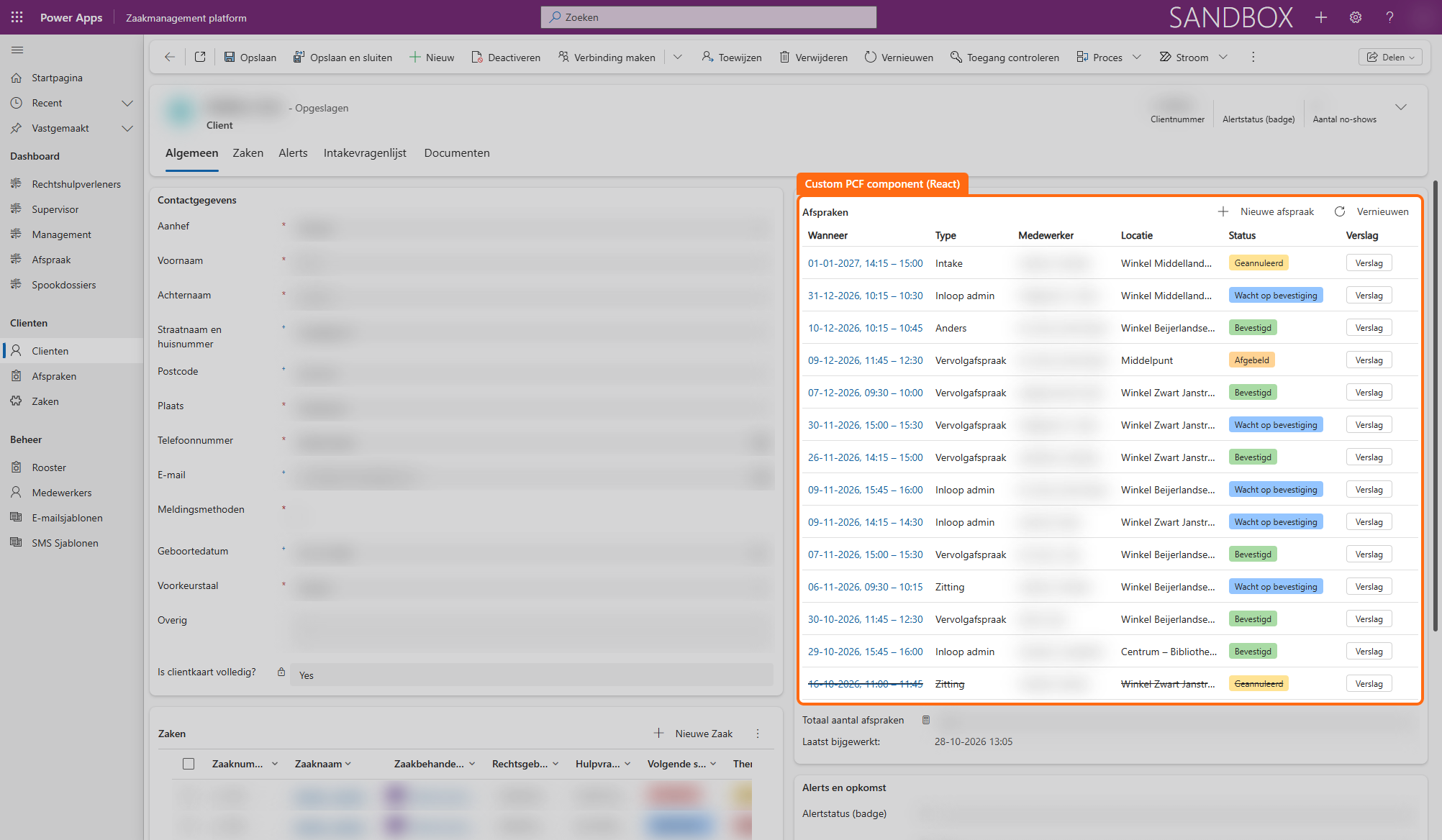
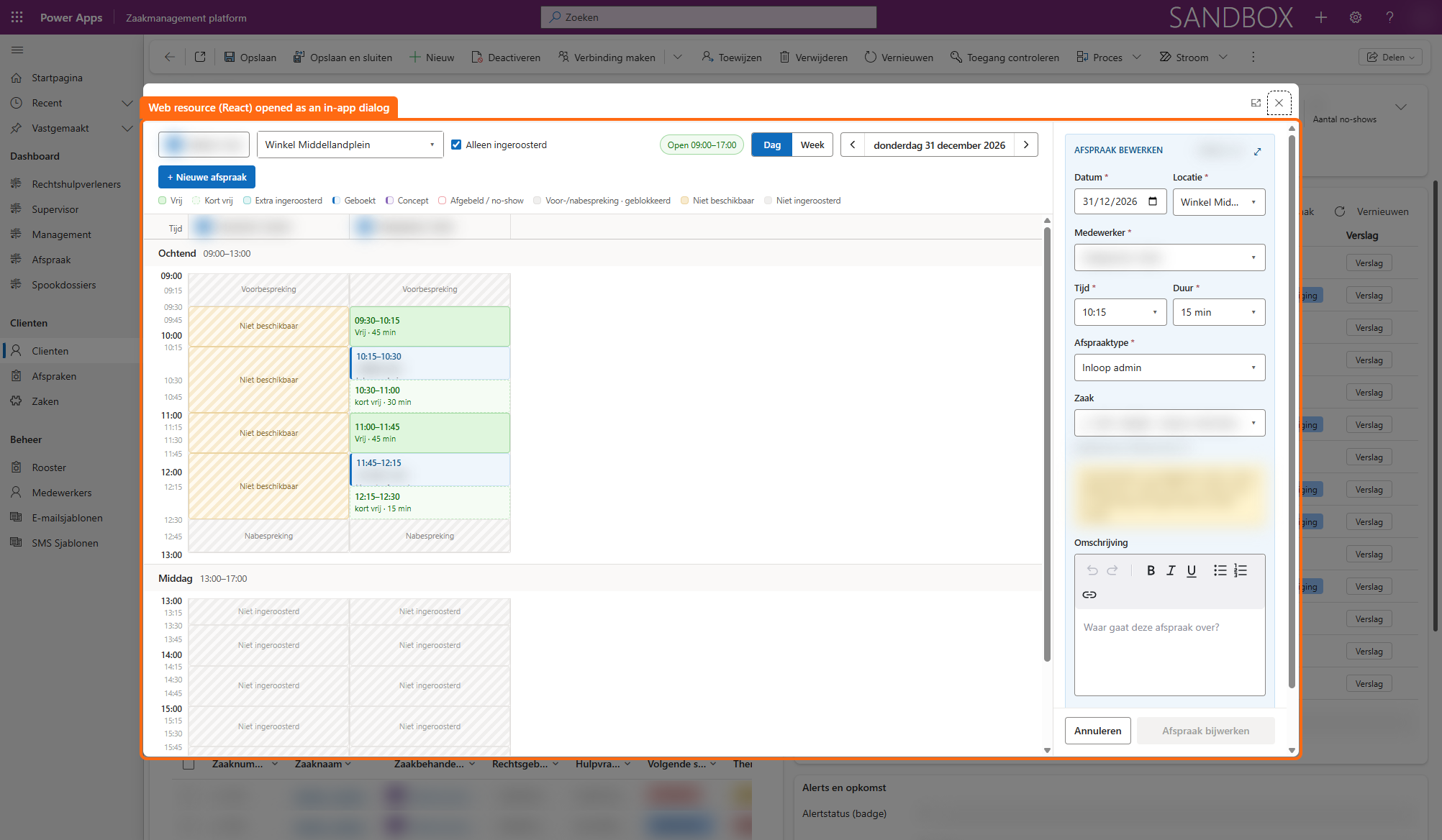
When you integrate custom code with out-of-the-box components that have certain limitations, an app can easily feel disjointed. We built the custom pages and components in React and found ways to integrate them with the Model Driven App. This made it possible to mount small components into standard forms, which then launch full-code pages. These pages can appear above forms as popovers, making them feel like part of the form.
In practice, a member of the support staff creates a new client record using a standard form. Inside that form is an overview table of that client's appointments, which is empty at this point.
They then book that client's first appointment in a popover, triggered from the overview, which hosts an advanced calendar page.
Close the popover and the overview table in the client form refreshes automatically. The new appointment shows up straight away, with its date, type, employee, location and status. There's no need to navigate away or reload the page to check that the booking went through.
For staff planning, we built a separate custom page: the roster. On the left you see every employee, with the number of shifts they work per week and labels such as 'Absent this week' or 'Change planned'. Select an employee and you get three panels: their roster, extra availability and absence.
Creating a new roster takes just a few steps: you choose the location, the days and whether someone works mornings, afternoons or evenings. Each roster covers a set period, so you can plan changes ahead. You can see at a glance which roster applies now and which one starts at a later date.
Absence, such as a week's holiday, is logged on the same screen. The app then shows which appointments fall within that period, so support staff can reassign them to colleagues who are available.
Managing development
Custom code inside the Power Platform can require creative solutions to ease development tasks.
Testing locally. Power Platform doesn't allow for local database development that can be deployed to the hosted environments. To enable API calls to the hosted database while developing the frontend locally, a Blis colleague had built a local proxy for use with the Power Pages API. For this project, we adapted it for use with the Dataverse API, the low-code Power Platform database. That meant we could test our code against Dataverse from our own machines. You can read more in our Power Platform Development Toolkit series.
One shared codebase. While we built the scheduling, another colleague was building a note-taking and task management tool for the same app. The two overlapped, so we merged them into one repository. Both tools now share building blocks, data definitions and styling. A tool called Renovate helps us manage dependencies.
Deploying only what changed. A pipeline in Azure DevOps rolls the code out to the client's environment. Because multiple people work on separate parts of the same codebase, the pipeline compares each new build with what's already been published and only deploys the parts that changed. This keeps deployments light, even with a few developers working at the same time.
Is this approach right for you?
Combining low-code and full code in one app makes sense when:
- most of your process fits within the standard Power Apps solutions, but one or more parts have requirements that don't
- your users need to stay in one flow instead of switching between applications
- you want to keep low-code for the bulk of the app, so it stays easy to maintain but has the flexibility to be extended
Recognise this in your own organisation? Get in touch with our Low code & AI team. We'll help you work out where low-code stops for you, and what to build around it.
FAQ
Frequently asked questions
We'd be happy to answer those right away. If your question isn't listed, please feel free to contact us.
Low-code is ideal for forms, tables and dashboards you want to build quickly and maintain easily. Full code comes in where standard components fall short, such as complex scheduling or interfaces with a lot of logic.
A PCF component is a custom-built part, for example in React, that you add to an app through the Power Apps Component Framework. It lets you add functionality that the standard Power Apps components don't offer.
Yes, as long as you limit custom code to the parts that really need it. Most of the app stays low-code, and a shared codebase with a smart pipeline keeps the custom work manageable.
During discovery, map out what users need to be able to do in each part of the app. If you need workarounds to fit something into standard tables and forms, that part is often better off in full code.
Yes. You can extend an existing Model Driven App with custom components and pages without rebuilding the rest of the app. That means you can start with low-code and add custom work later.